How to Map (and Fix) Your True Data Risk
Most data security programs are stuck in a game of "Groundhog Day."
%20Your%20True%20Data%20Risk.avif)
A policy trips. An alert fires. You check the timeline, ask the user what happened, and close the ticket with a shrug. A week later, the exact same alert fires again — different person, different file, same headache.
If you treat every alert as an isolated incident, you will spend your entire career triaging noise. But if you zoom out, you stop seeing "incidents" and start seeing workflows.
That’s the difference between Detection (catching a leak) and Posture (fixing the leak at the source). Here is how to stop chasing alerts and start mapping your true risk.
Your Alerts Are Lying to You (By Omission)
Traditional DLP and DSPM tools are optimized for the snapshot:
- DLP says: "This file moved here."
- DSPM says: "This file lives here."
That’s useful data, but it’s not context. It doesn’t answer the only question that actually matters: Is this a one-off mistake, or is this how work actually gets done here?
If you don't know the answer, you’re trapped in the "Alert → Nag User → Close Ticket" loop. To break out, you need to stop looking at pixels and start looking at the picture.
The "Shadow Workflow" Hiding in Plain Sight
Let’s look at a real-world example we saw recently.
A customer kept seeing alerts triggered in their Finance department. Sensitive spreadsheets were flowing into personal GenAI accounts.
- The old DLP view: "Finance is reckless. Block personal GenAI. Send them to security training."
- The Jazz view: We stacked the investigations together and saw a pattern.
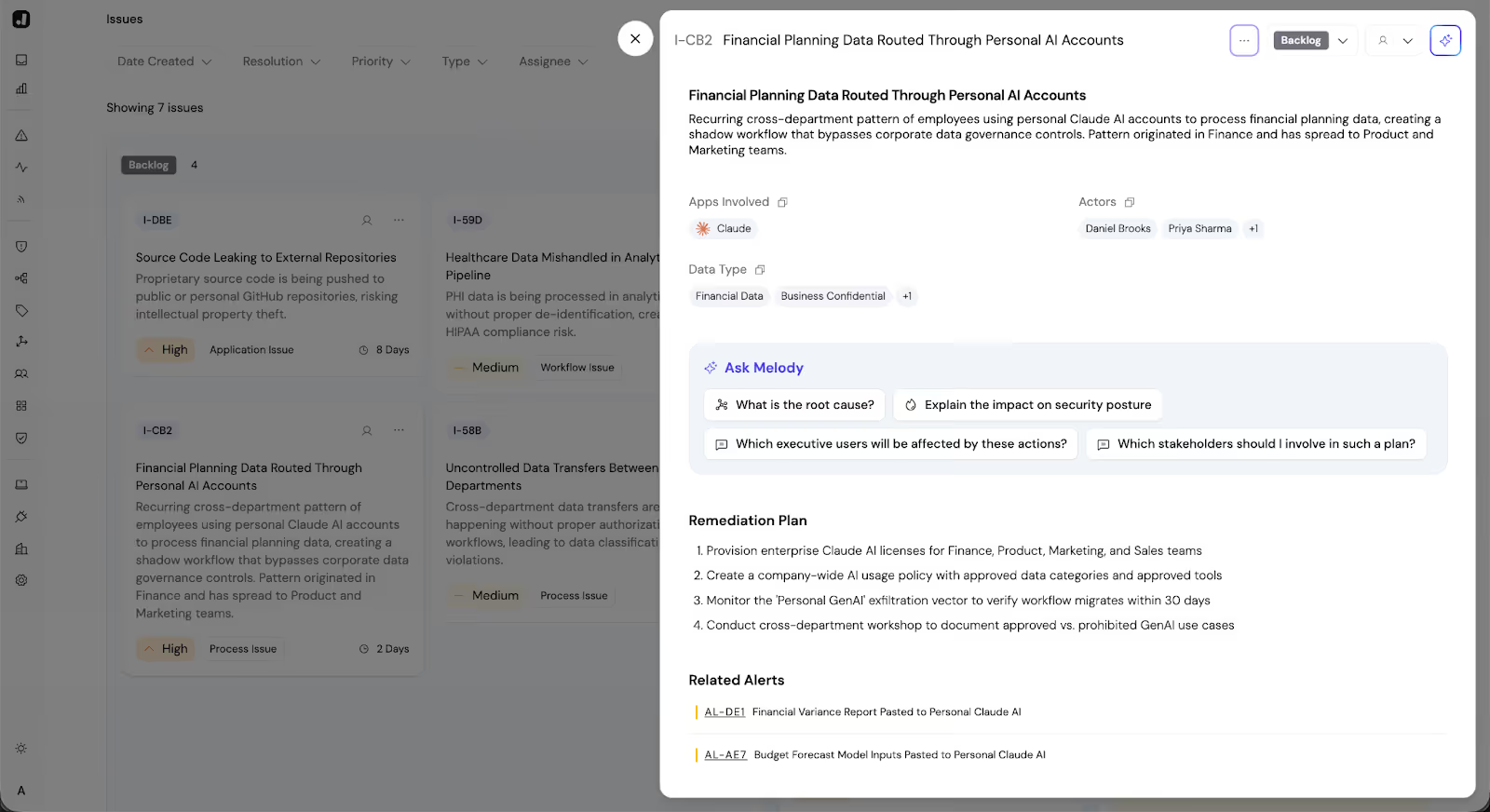
It wasn't malicious, and it wasn't lazy. The Finance team had discovered that a specific GenAI model (accessible only via personal accounts) was significantly better at summarizing variance reports than the corporate-approved tool.
They weren't bypassing security to be difficult; they were bypassing it to be efficient. That preference had hardened into a workflow.
Don't Just Log It. Stack It.
This is where Jazz changes the game. It doesn't start with static rules; it starts with the Investigation.
Because our Agentic Investigator autonomously analyzes the context of every event (User, Data, System, and Business Intent), we can "stack" these investigations to reveal the hidden architecture of your risk.
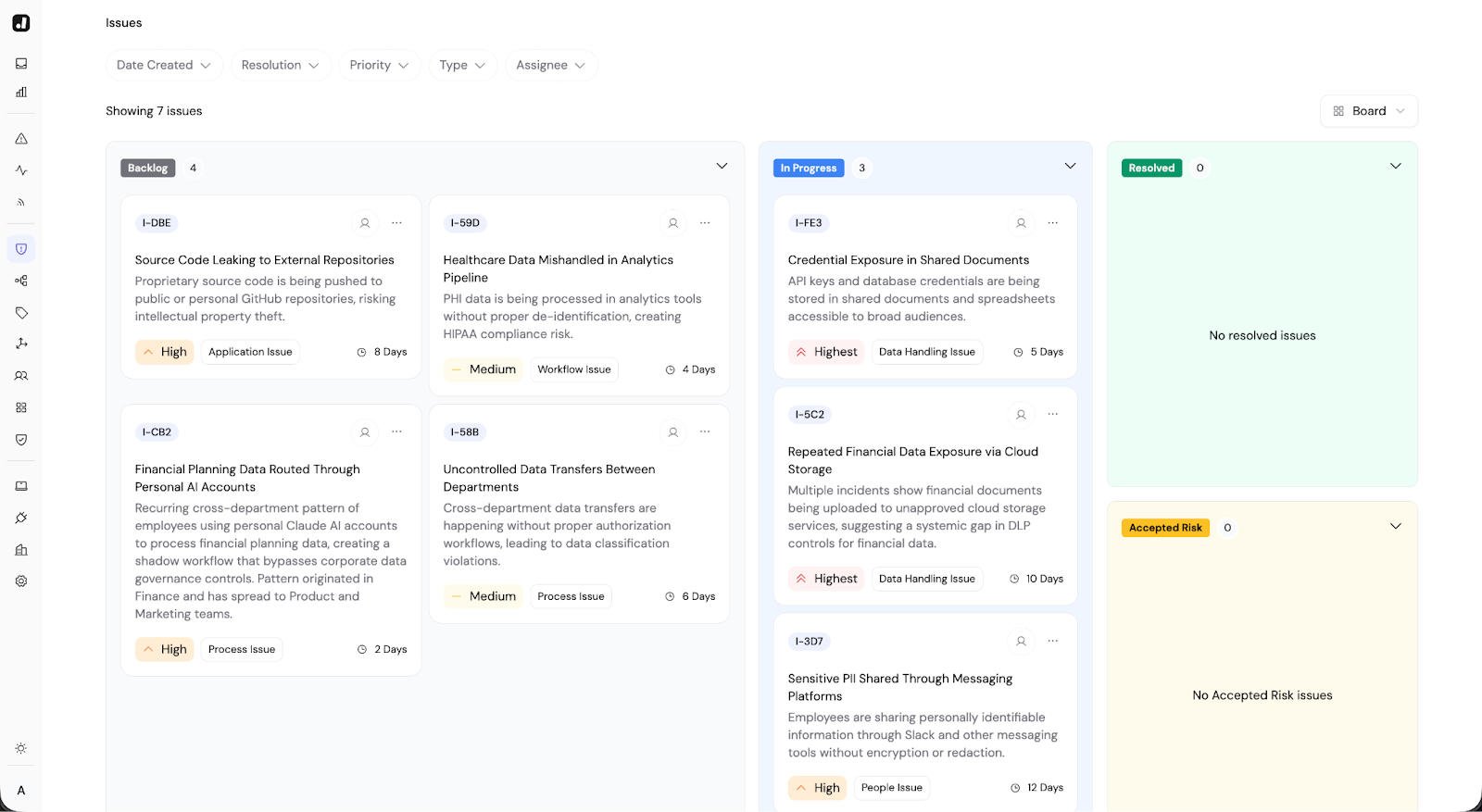
Instead of a list of 500 alerts, you get a Posture Map that says:
"You have a recurring workflow in Finance where users are moving planning data to Personal GenAI to speed up reporting."
Now, you’re not fighting 500 users. You’re solving one business problem.
The Fix: Move the Boundary, Don't Block the Work
Once you see the workflow, the solution is rarely "block it." If a tool helps your team move faster, they will find a way to use it. The goal of Posture Management isn't to stop the work; it's to move the work inside the boundary.
In the Finance example, the fix wasn't a firewall rule. It was a business decision:
Diagnose: The driver is "Tool Preference," not "Negligence."
Solve: Buy the Enterprise license for the tool they actually like.
Verify: Watch the "Personal GenAI" workflow on your Posture Map shrink to zero as the "Enterprise GenAI" workflow takes over.
You didn't just close a ticket. You hardened your security posture and made the Finance team happier.
What "Good" Looks Like (The 30-Day Cycle)
The best security teams don't treat Posture as an annual audit, but as a monthly rhythm:
- Week 1: Look at your Posture Map. Pick the top 2 "Issues" (recurring workflows that drive risk).
- Week 2: Diagnose the driver. Is it a broken business process? A lack of tooling? A training gap?
- Week 3: Apply the fix. (Nudge users, update policy, or buy the tool).
- Week 4: Watch the trendline drop.
The takeaway: You can’t protect what you don’t understand. By moving from "Alerts" to "Posture," you stop being the "Department of No" and start being the team that helps the business run faster — safely.